AI Approval Workflow: Why a Changed Proposal Needs New Approval
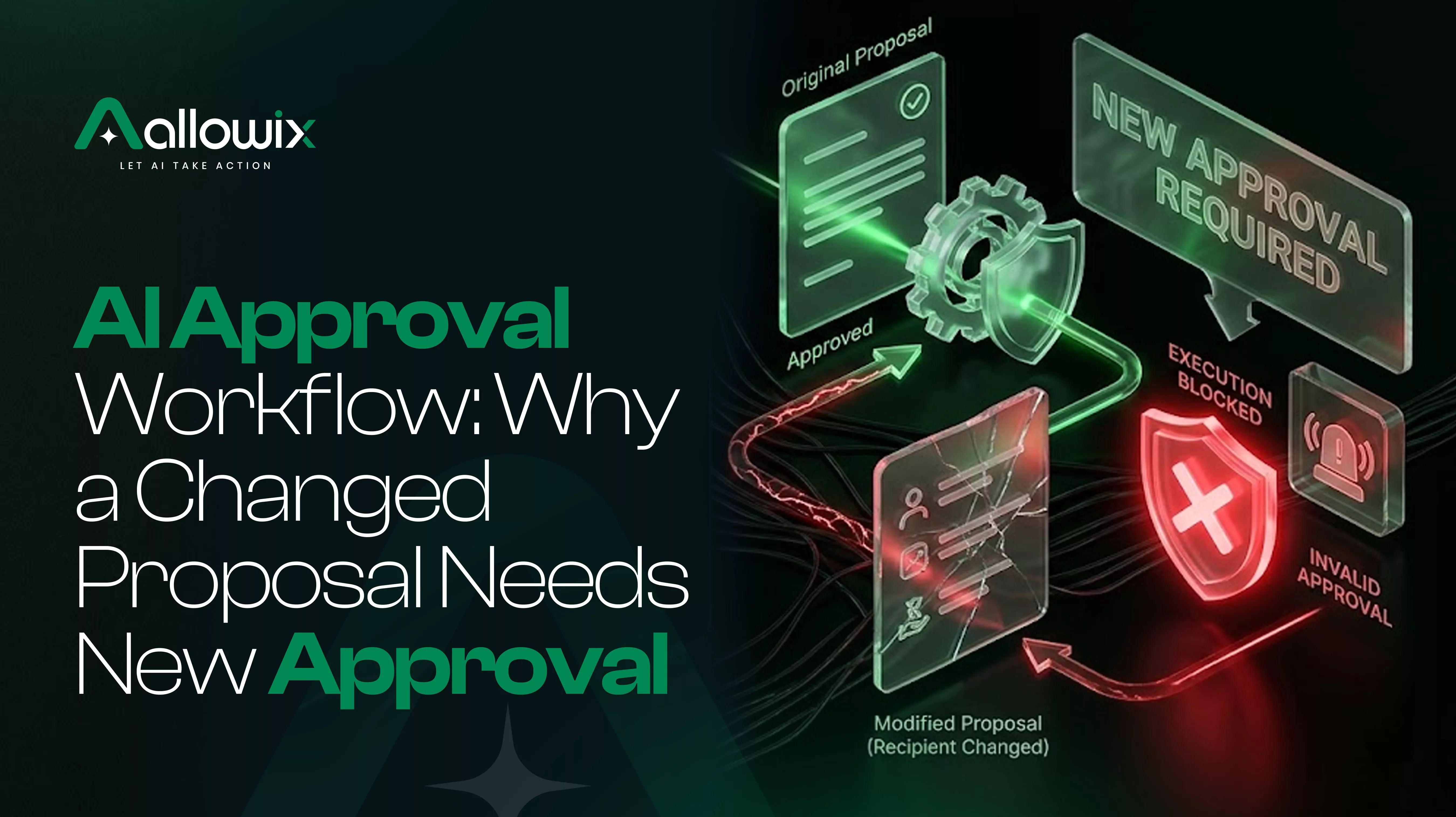
You approved an AI-generated email yesterday. Today, the agent changes the recipient and adds a new commitment to the message. Should it still be allowed to send the email because you already clicked Approve?
It shouldn’t.
An AI approval workflow should authorize a specific action, not give an AI agent a blank cheque to make changes later.
This matters as businesses use AI agents to draft emails, update customer records, process requests, and automate everyday workflows. Human approval can help keep these actions under control, but only when the approval still matches what the agent is about to do.
In this guide, we’ll look at how outdated approvals happen, what an AI approval process needs to check, and how to prevent a changed proposal from slipping through an old approval.
Contents
- Key takeaways
- How an AI approval workflow can fail
- What should an AI approval workflow check?
- How to prevent stale AI approval
- What should be automated, and what should stay human?
- Who owns an approval that needs to be repeated?
- Where Allowix fits into the AI approval workflow
- Frequently Asked Questions
- Conclusion
Key takeaways
- An approval should apply to the exact action a person reviewed.
- If the recipient, amount, message, or action changes, the system should reassess whether approval is still valid.
- AI agent human approval must happen before the protected action executes.
- The system should compare the approved proposal with the final action instead of relying on the AI to decide whether a change is minor.
- An audit trail should help reviewers understand what was approved and what actually happened.
How an AI approval workflow can fail
Imagine a sales agent preparing a follow-up email for a customer.
On Tuesday, the agent drafts a message confirming a meeting. A team member reviews it and clicks Approve.
On Wednesday, the agent updates the draft. The recipient changes, a discount is added, or the message includes a commitment the employee never reviewed.
Yet the system still sees Tuesday’s approval ID and allows the email to go out.
The approval exists, but it no longer represents the action being executed.
This is a problem with stale AI approval: a previously approved action is changed, but the system continues to treat the original decision as valid.
The same issue can appear in other workflows:
- A refund amount changes after approval.
- An AI agent selects a different customer account.
- A database update includes additional fields.
- A message changes after a manager reviews it.
- A different tool is called to carry out the action.
In each case, the original approval may have been legitimate. The problem is reusing it for a different proposal.
What should an AI approval workflow check?
The system needs to compare the action that received approval with the action that is about to execute.
Here are four important areas to check.
1. The recipient or affected record
If a person approves an email to one customer, that approval should not automatically authorize sending it to another customer.
Likewise, approval to update one account should not cover a different account simply because the action type is unchanged.
2. The message or proposed change
A small formatting adjustment may not change the meaning of a message. Adding a promise, changing a price, or introducing new instructions can.
Teams should define which changes matter for each workflow. The AI agent should not decide on its own that a meaningful change is harmless.
3. The amount or transaction details
If someone approves a refund of $50, that decision should not automatically cover a refund of $500.
The amount, currency, transaction reference, and other relevant fields should be checked against the approved proposal.
4. The action or tool being executed
Approval to prepare a draft is not approval to send it. Permission to read a customer record is not permission to modify it.
The system must verify that the final action is the one the person authorized.
A useful rule is simple:
If a change affects the meaning, target, scope, or consequences of the action, reassess the approval before execution.
How to prevent stale AI approval
A reliable AI approval process needs more than an approval button. It needs a check at the point where the action is about to happen.
A practical workflow looks like this:
- Prepare: The AI agent creates a proposed action.
- Review: The system presents the relevant details to an authorized person.
- Approve: The person approves that specific proposal.
- Verify: Before execution, the system compares the final action with the approved version.
- Execute or pause: If the required conditions still hold, the action proceeds. If the proposal has changed in a way that invalidates approval, execution stops and a new decision is requested.
- Record: The system records the approval, relevant checks, and execution outcome.
The key is the verification step.
Without it, a system may record that a person approved something without establishing whether the action that eventually ran was the same one they reviewed.
For stronger verification, the implementation can bind approval to a stable representation of the proposal, such as a version or a cryptographic digest of the relevant action details. The system should also recheck authorization and policy at execution time.
What should be automated, and what should stay human?
Good AI guardrails automate repeatable checks while leaving consequential decisions with the right person.
Automate the checks
- Compare the approved proposal with the final action.
- Detect changes to important fields.
- Stop execution when required approval is missing or invalid.
- Recheck permissions and policy before the action runs.
- Record the approved version and the actual outcome.
Keep the decision with an authorized person when required
- Decide whether a changed proposal is acceptable.
- Approve a revised refund, message, or business transaction.
- Resolve exceptions that fall outside the existing policy.
- Decide whether a workflow needs narrower permissions.
This is where human-in-the-loop AI becomes useful. The goal isn’t to ask people to approve every routine step. It is to make sure they approve the actions that require their judgment.
A notification after execution is not the same as approval before execution.
Who owns an approval that needs to be repeated?
There’s another practical issue: what happens when a proposal changes and needs another review?
Someone must own that queue.
Depending on the business, it might be a team manager, an operations lead, or a designated approver. The role should be clear before the workflow goes live.
Otherwise, two problems can appear. The workflow may remain blocked because nobody handles the new request, or someone may bypass the check to keep work moving.
Define who reviews changed proposals, how the request is presented, and what happens when an approver is unavailable.
The system should fail safely when required approval is missing, rather than quietly treating an old approval as sufficient.
Where Allowix fits into the AI approval workflow
Defining an approval policy is one part of the job. Enforcing it when an AI agent attempts to act is another.
Allowix is a governed AI layer from Solvefy designed to connect AI agents with existing business software.
Its governance approach brings together four checks:
- Permission: Is the agent authorized to perform the action?
- Policy: Does the action comply with the applicable rules?
- Approval: Has the required person approved the relevant proposal?
- Audit: Can the decision and outcome be reviewed?
For an approval to remain valid, the system needs to check the approved action against the payload about to execute. If a material change invalidates the original approval, the action should return for a new decision.
The principle is that the AI agent cannot decide that its own revised proposal is close enough to what a person previously approved.
Allowix provides the governance gate; your team still defines its policies, approval requirements, and business rules.
Frequently Asked Questions
What is an AI approval workflow?
An AI approval workflow is a process in which an AI-generated action is checked against defined rules and, when required, reviewed by an authorized person before execution.
What is stale AI approval?
Stale AI approval occurs when a previously approved proposal changes, but the system continues to treat the original approval as valid for the revised action.
Can an AI agent reuse an old approval?
Only if the system establishes that the approval remains valid for the action about to execute under the applicable rules. A material change to the recipient, amount, scope, or action should trigger a fresh review when the original approval no longer covers it.
Does human-in-the-loop AI mean approving every action?
No. Low-risk actions may run automatically when authorized. Human approval should be required where the consequences, policies, or workflow demand it.
How can you prevent an AI agent from executing an unapproved change?
Compare the final action with the approved proposal immediately before execution. Recheck permissions and policy, stop the action if required approval is invalid, and request a new decision before proceeding.
Does Allowix replace our existing approval policy?
No. Allowix provides a governance layer to enforce defined checks. Your organization remains responsible for deciding which actions are permitted and which require approval.
Conclusion: approval must match the action
An approval is not a permanent permission slip for an AI agent.
It is a decision about a particular proposal, made with particular information, for a particular action.
When that proposal changes, the system must determine whether the original approval still applies. If it doesn’t, execution should pause until the required person reviews the updated action.
Before your next AI-powered workflow goes live, ask one question: can your system prove that the action it is about to execute is the action someone actually approved?
That is the difference between recording an approval and enforcing one.
See governed agents in your own product.
Book a demo and we'll walk your team through the governance model, the two-seam integration, and a use case for your industry.