
Why AI Agents Fail at Multi-Step Business Tasks (And How to Fix It)
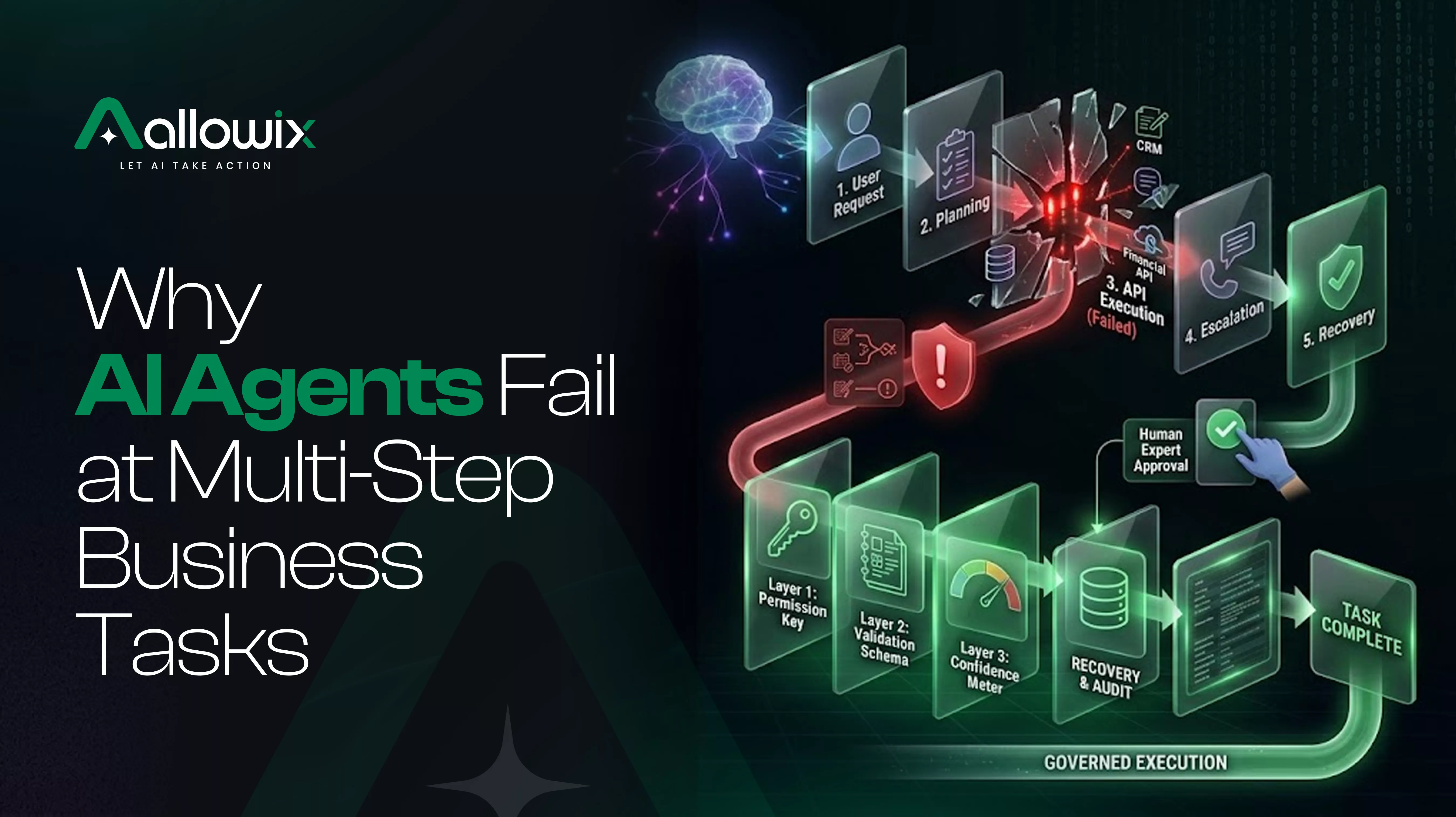
An AI agent can complete a task correctly and still fail to finish the job.
Imagine asking an AI agent to handle a new sales lead. It needs to find the lead in your CRM, review previous conversations, prepare a personalized email, update the lead status, and schedule a follow-up.
The first two steps go smoothly. The email looks good. Then the agent updates the wrong record or schedules a meeting without checking availability.
The task was not especially complicated. But one mistake affected everything that came after it.
This is one of the biggest challenges in AI agent reliability. An agent does not just need to produce a good answer. It needs to complete a sequence of actions, keep track of what happened, and verify that the intended result was actually achieved.
For businesses exploring AI workflow automation, the important question is not simply whether an AI agent can perform a task. It is whether the entire workflow can be completed correctly and consistently.
In this guide, we will look at why AI agents fail at multi-step tasks, how small mistakes turn into bigger problems, and what businesses can do to make AI-powered workflows more reliable.
Contents
Key takeaways
- AI agents can struggle when several dependent actions must succeed in sequence.
- A mistake in one step can affect every step that follows.
- A successful tool call does not necessarily mean the business task is complete.
- Verification, clear workflow states, and recovery procedures help prevent errors from spreading.
- Businesses should evaluate complete workflows rather than judging an agent by a successful demonstration.
- Reliable AI automation requires more than selecting a capable AI model.
Why do AI agents fail at multi-step tasks?
A traditional automation workflow usually follows predefined instructions. If a condition is met, the system performs the corresponding action.
AI agents work differently. They may interpret a request, decide which tool to use, process the tool's response, and choose what to do next. That flexibility is useful when a task requires judgment, but it also introduces more opportunities for mistakes.
Consider an AI agent processing a customer support request. It may need to identify the customer, retrieve an order, check the delivery status, determine the appropriate response, and update the support ticket.
Each step depends on information from the previous one.
If the agent retrieves the wrong order, it might give an incorrect answer. If the ticket update fails but the agent assumes it succeeded, the customer may receive a response while the support system still shows the request as unresolved.
The agent may appear to have finished, even though the actual business process remains incomplete.
This is why AI agent reliability must be evaluated across the entire task, not just individual actions.
5 reasons AI agents fail in real business workflows
1. Small mistakes spread across multiple steps
One incorrect assumption can affect an entire workflow.
An agent might misunderstand a customer's request, select the wrong record, or use outdated information. Later steps may still look reasonable because they are based on that original mistake.
For example, a sales agent could identify the wrong company in a CRM. It then prepares a personalized message using that company's details and records the follow-up against the same incorrect account.
The email might be grammatically perfect. The workflow is still wrong.
How to fix it: Validate important information before allowing the workflow to continue. Confirm the correct customer, record, or transaction before performing actions that depend on it.
2. The agent loses track of what has already happened
Multi-step tasks often involve several tools and changing information.
An agent may retrieve a document, call an external service, update a record, and then continue with the next step. If it does not correctly track the current state, it can repeat an action or overlook something that has already been completed.
Imagine an agent creating a support ticket. The first request succeeds, but the response times out. The agent cannot tell whether the ticket was created, so it tries again.
Now the support team may have two tickets for the same issue.
How to fix it: Maintain a clear record of completed steps, pending actions, and confirmed outcomes. Before retrying an action, check whether the previous attempt already changed the system.
Where possible, use idempotent operations or unique request identifiers so repeating a request does not create duplicate results.
3. Connected tools do not behave as expected
AI workflow automation often depends on APIs, databases, CRMs, calendars, and other business applications.
These tools can return incomplete data, reject a request, reach a rate limit, or become temporarily unavailable. An agent must interpret those responses correctly instead of assuming every request succeeded.
For example, an AI scheduling agent may prepare a meeting invitation but fail to save the calendar event because the service is unavailable.
If it reports that the meeting has been booked without checking the result, the user is left with a false confirmation.
How to fix it: Check the response from each important tool call. Distinguish between a successful operation, a failed request, and an uncertain outcome. Use controlled retries for temporary failures and escalate unresolved issues when necessary.
4. The workflow has no clear definition of success
A task can look complete from the agent's perspective while remaining unfinished from the business's perspective.
Suppose an agent is asked to process an employee leave request. It reads the request, summarizes the details, and drafts a response.
But the actual process requires the request to be approved, the employee's leave balance to be updated, and the team roster to reflect the absence.
Producing a response does not complete that process.
How to fix it: Define the expected final state before building the workflow. Specify which records must exist, which changes must be confirmed, and which conditions must be satisfied before the agent reports completion.
A useful completion check asks: did the system reach the intended state, or did the agent merely finish generating its response?
5. The agent cannot recover when something goes wrong
Failures are inevitable in complex workflows. The bigger problem is when an agent has no reliable way to handle them.
An agent might encounter missing information, an unavailable API, or an unexpected response. Without a recovery plan, it may keep trying the same action, make an unsupported assumption, or stop without explaining what remains unfinished.
How to fix it: Define what happens when a step fails. The agent should know when to retry, when to request missing information, when to undo a reversible change, and when to ask a person for help.
Not every error should trigger another attempt. Sometimes the safest next step is to stop and explain what needs attention. See also: human in the loop AI agents.
How to make AI workflow automation more reliable
Understanding why AI agents fail is only the beginning. Businesses also need a practical way to prevent failures and detect them before they affect customers or internal operations.
Here are five measures to consider.
| Reliability measure | What it helps prevent |
|---|---|
| Validate inputs | Acting on incorrect or incomplete information |
| Track workflow state | Repeating actions or skipping required steps |
| Verify results | Reporting success when a change did not happen |
| Plan for recovery | Repeating failures or leaving tasks incomplete |
| Record execution history | Making failures difficult to investigate |
These measures work together. Verification without recovery can identify a problem but leave the workflow stuck. Recovery without state tracking can create duplicate actions. Logging without clear success criteria can record every step without showing whether the job was actually completed.
The objective is to build a workflow that can recognize when something has gone wrong and respond appropriately. An AI agent audit trail is one part of that picture.
Test the whole workflow, not just the AI agent
A common mistake is evaluating an AI agent using a handful of successful demonstrations.
A demo may show an agent finding a customer, drafting an email, or updating a record. That proves the system can perform those actions in the tested scenario. It does not establish that it will complete the full workflow reliably across different inputs and failure conditions.
A more useful evaluation tests the entire business process.
For example, when testing a sales follow-up agent, include scenarios where:
- The CRM contains two customers with similar names.
- The required contact information is missing.
- The email service becomes unavailable.
- The CRM update succeeds but the next step fails.
- A meeting slot is no longer available.
- The same request is submitted twice.
For each scenario, check whether the agent reaches the correct outcome, identifies problems, avoids duplicate actions, and communicates what remains incomplete.
Also repeat the tests. AI agent behavior can vary between runs, so a single successful result is not enough to establish consistency.
Track useful measures such as end-to-end completion rate, incorrect actions, recovery rate, duplicate operations, and the number of tasks requiring human intervention.
Do not combine these into an invented universal reliability score. Choose measures that reflect the actual workflow and the consequences of failure.
When should a business use AI agents instead of traditional automation?
Not every business process needs an AI agent.
Traditional automation is often a better choice when a workflow follows stable rules, uses predictable inputs, and requires the same actions every time.
AI agents can be useful when a task involves interpreting unstructured information, handling different requests, or selecting among several possible next steps.
Some workflows benefit from both.
For example, an AI agent can interpret a customer email and identify the requested action. A conventional workflow can then validate required fields, apply business rules, and confirm whether the action was completed.
This approach allows AI to handle flexible interpretation while deterministic systems handle operations that require predictable behavior.
The decision should depend on the work itself, not the assumption that a more autonomous system is always better. Related: AI agent vs chatbot.
Where Allowix fits into reliable AI workflows
Making an AI agent more reliable is not just about improving its reasoning. Businesses also need to understand what happens when an agent interacts with connected tools and attempts to carry out an action.
Allowix, published by Solvefy, is relevant to the control and governance side of AI execution.
The distinction is important: an agent may decide what it wants to do, but the surrounding system still needs to determine whether that action is permitted and whether additional approval is required.
For a business workflow, this means thinking beyond the agent's final response. Teams need to consider how actions are governed, how approval requirements are applied, and how execution can be reviewed. See AI agent governance framework and AI agent security.
Allowix belongs in that broader discussion about controlling AI actions within business workflows. Its specific role should be evaluated against the controls and capabilities documented for the relevant implementation.
Reliable execution requires both a capable agent and a workflow designed to handle the situations where the agent gets something wrong.
Frequently Asked Questions
Why do AI agents fail even when they perform individual tasks correctly?
A complete workflow depends on multiple steps working together. An agent may perform each action reasonably well in isolation but still fail because of an incorrect assumption, a missing dependency, a tool error, or an unverified result.
How can I improve AI agent reliability?
Start by defining what successful completion means. Validate important inputs, track workflow state, verify consequential actions, test failure scenarios, and establish recovery procedures for incomplete or unsuccessful steps.
What is the difference between AI agent reliability and AI model accuracy?
Model accuracy concerns how well a model performs a particular task or evaluation. AI agent reliability concerns whether the complete system consistently achieves the intended outcome across its workflow, including tool use, external systems, and recovery from errors.
Can AI agents work reliably across multiple applications?
They can be designed to handle cross-application workflows, but reliability depends on the complexity of the task, the quality of integrations, state management, error handling, and verification. Test the complete process before relying on it in production.
Should every AI agent action be checked by a human?
Not necessarily. Low-risk, reversible actions may be suitable for automation with appropriate checks. Actions with significant financial, customer, legal, or operational consequences may require human review, depending on the business context.
How do I know if an AI workflow is ready for production?
Test it against representative real-world scenarios, including missing data, service failures, repeated requests, and unexpected inputs. Measure complete task outcomes, review failures, and confirm that the workflow can recover or escalate when necessary.
Conclusion: a good AI agent must do more than start the job
AI agents are becoming useful for business tasks that involve multiple tools, decisions, and actions. But completing one step correctly does not guarantee that the whole process will succeed.
The difference between an impressive demonstration and a dependable workflow is what happens between the steps: how information is validated, how progress is tracked, how outcomes are verified, and how errors are handled.
Before automating a complex process, define what success looks like and test what happens when things do not go according to plan.
The real question is not whether your AI agent can complete the workflow once. It is whether your business can trust the process when something goes wrong.
When an AI agent fails halfway through a task, does your workflow detect the problem and recover, or does someone discover it after the damage is done?
See governed agents in your own product.
Book a demo and we'll walk your team through the governance model, the two-seam integration, and a use case for your industry.